Blog Article
Claude Code as an Agent Harness: The Complete Practitioner's Guide
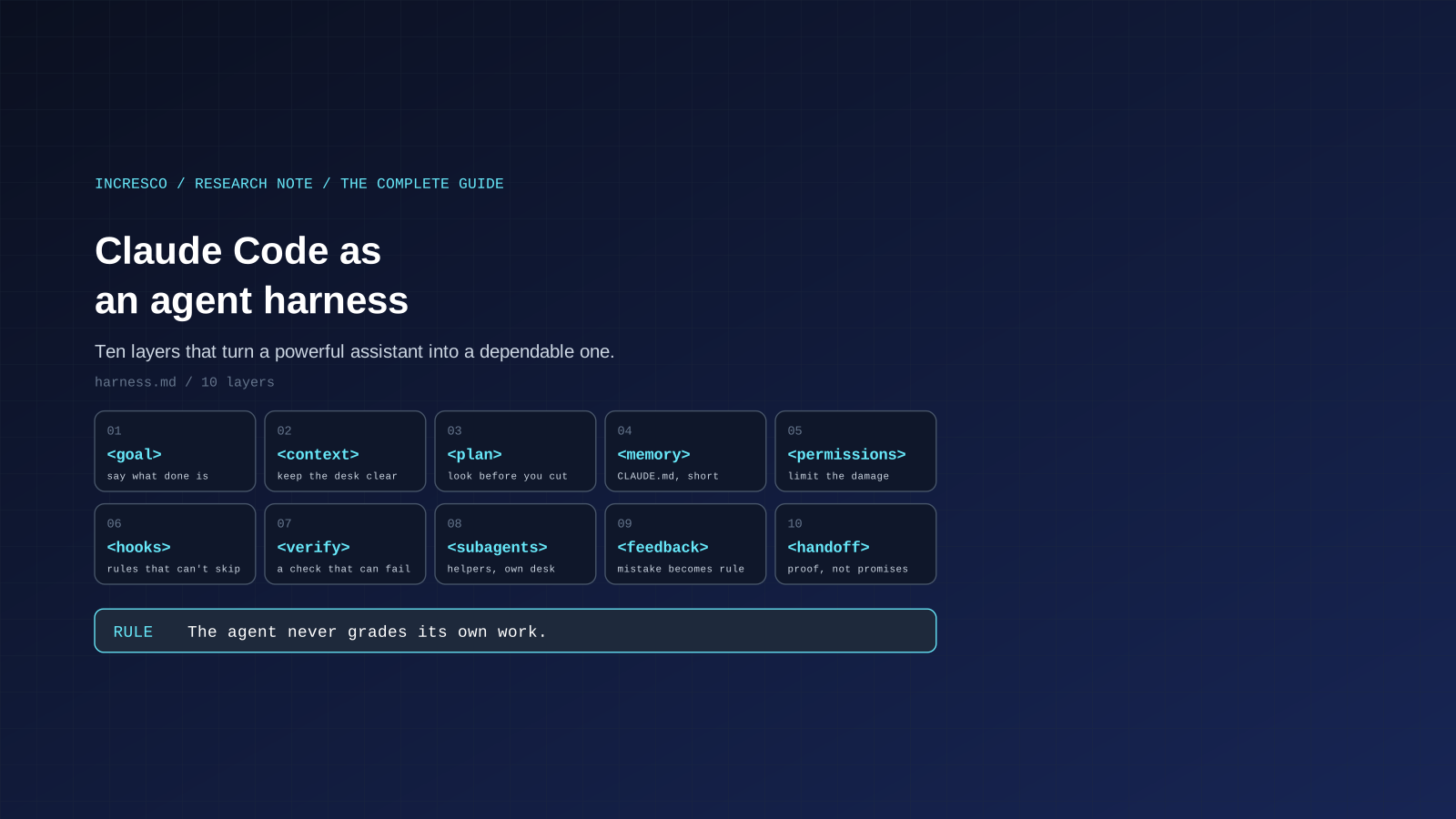
A plain-language research note on running Claude Code as an agent harness: goal, plan, memory, permissions, verification, subagents, hooks, parallel runs and handoff. Every behavior checked against Anthropic's docs.

Claude Code is an AI assistant from Anthropic that works inside your software project. It can read your files, run commands, change code and check its own work. Because it acts on its own instead of just answering questions, people call this kind of tool an agent.
Here is the idea this whole article rests on. A strong agent is not made by a clever prompt. It is made by the setup around it. We call that setup a harness, the way a horse harness or a climbing harness is the gear that keeps a powerful thing safe and pointed in the right direction. A harness answers five plain questions. What does the agent know before it starts? What is it allowed to touch? How does it know the work is finished? Who checks the result? And what happens to the lesson when it gets something wrong?
This is a long guide. You do not need to know Claude Code already. Every special term is explained the first time it appears, and there is a short glossary near the end. The structure and wording are ours. We were inspired by public posts from Boris Cherny, creator of Claude Code, about how he works with the tool. Every product behavior below is checked against Anthropic’s own Claude Code documentation, linked at the end. Where something is our own practice instead of documented behavior, we say so.
One Example We Will Reuse
Imagine a small web app, and you ask the agent: “Add a password reset by email.” That sounds simple. It touches the login code, the email sending, the database and the tests. It is a good example because there are many ways to get it subtly wrong. We will come back to it in each section.
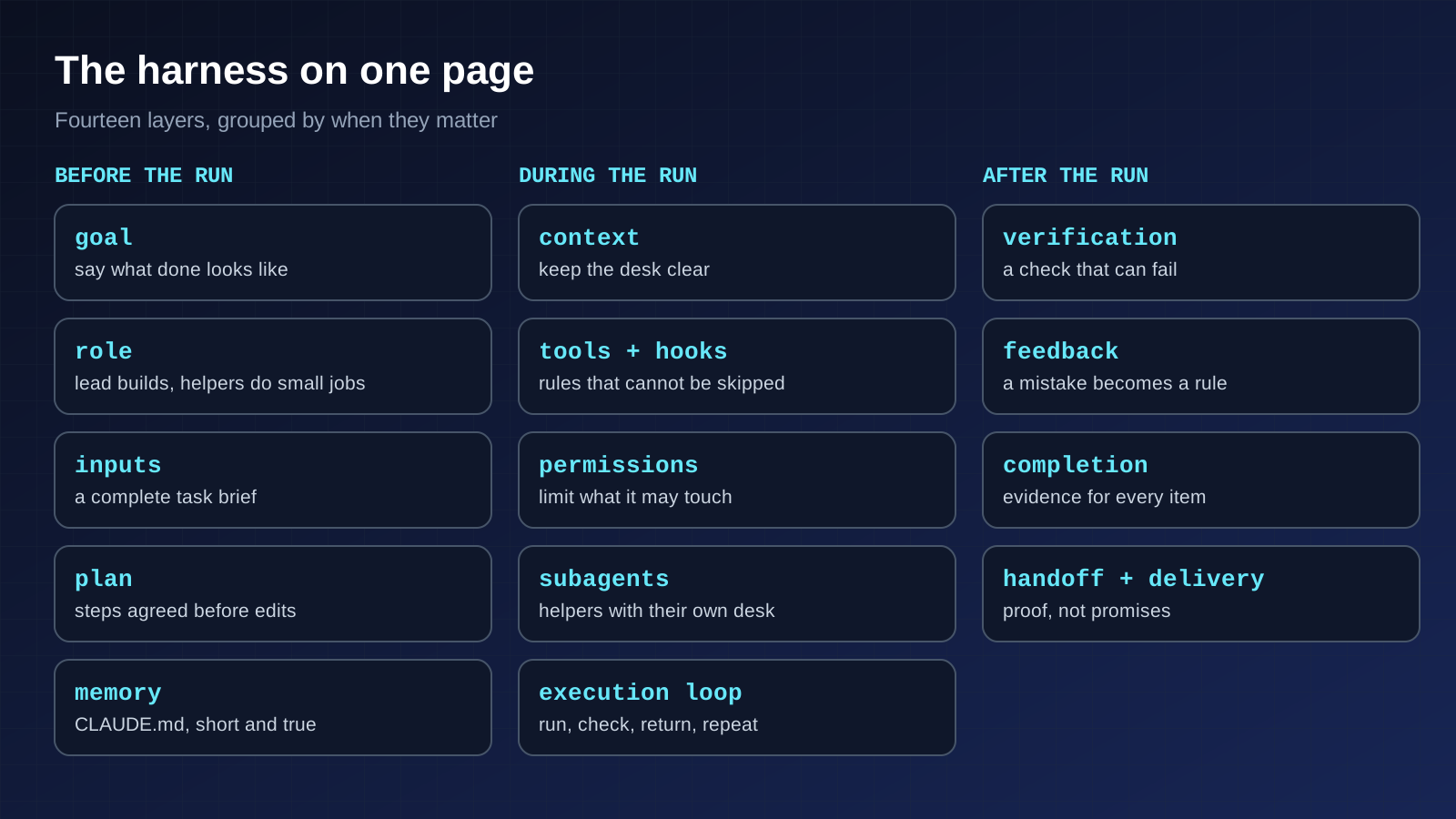
The Harness on One Page
| Layer | Its job, in plain words | Does the tool force it? |
|---|---|---|
| Goal | Say what “done” looks like | No, it is up to you |
| Role | Decide who leads and who does bounded work | No |
| Principles | The few habits everything else rests on | No |
| Inputs | Hand over a complete task brief | No |
| Plan | Agree on the steps before any change | Yes, in plan mode |
| Context | Keep the agent’s short-term memory uncluttered | No |
| Tools and hooks | Make “always” and “never” automatic | Yes, for hooks |
| Permissions | Limit what it can touch | Yes |
| Memory | Give it facts it cannot learn from the code | No, it is advice |
| Verification | Give it a pass or fail test | Yes, if you gate it |
| Subagents | Hand side jobs to helpers | Partly, by tool list |
| Execution loop | Run, check, return failures, repeat | By your script or habit |
| Feedback | Turn a mistake into a lasting rule | Depends where you put it |
| Completion, handoff, delivery | Finish with proof and a clean trail | By human review |
The rest of this guide walks down that table. Each section ends with the named rules we use, so you can copy them.
1. Goal: Say What Done Looks Like
Anthropic’s guide says Claude can guess your intent but cannot read your mind, and that precise instructions mean fewer corrections. Its examples share a pattern: name the scope, point to an example, and describe the symptom.
- Scope means which file, which situation. “Add tests for foo.py” is vague. “Write a test for foo.py that covers a user who is logged out, and do not use mocks” is specific. (A mock is a fake stand-in for a real part of the system. Tests that use only fakes can pass while the real thing is broken.)
- Example means pointing at something that already exists: “look at how the existing widgets on the home page are built and follow that pattern.”
- Symptom means saying what you observe, where you think it is, and what fixed looks like: “users report login fails after the session times out, check the token refresh code, and write a failing test that reproduces it first.”
Our addition is to write the goal as a sentence that ends in a check. For the password reset: “Done when a new test proves the reset email is sent and the link works once, and the project’s checks pass.”
For bigger features, the guide describes an interview step. You ask Claude to interview you about edge cases and tradeoffs, and then write the result into a spec file. A spec is simply a written description of what to build. Then you start a fresh session to build it. The new session starts clean and focused, and you have a document to refer back to. The guide adds that the best specs name the files involved, say what is out of scope, and end with a test that proves the whole feature works.
Vague prompts still have a place. Anthropic notes they are useful when you are exploring and can afford to steer as you go.
2. Role: Who Leads, Who Does the Small Jobs
A harness works better when each party has a clear job. Ours is simple.
- The lead session builds and maintains the harness. It reads the project’s existing instructions and the current state of the work before it edits anything. It writes the plan, merges the results and decides what changes in the setup.
- Subagents do bounded work. Each gets one step, its inputs and its check, and nothing more (section 11).
- The human owns the goal and the last approval. You decide what “done” means and you sign off on the step that is hardest to undo.
Two named rules follow from this. Read before you edit: the lead looks at the project’s instructions and at the existing work first. Record decisions that change the harness: if a new rule, hook or permission is added during a run, it is written down where the next session will find it.
This split is our practice. The documentation describes the pieces, such as subagents with their own context and tools, and we arrange them this way.
3. Principles: Four Habits Everything Rests On
If you remember nothing else, remember these. Each one matches advice in Anthropic’s own best-practices guide, and they echo what Boris Cherny has said publicly about how he works with Claude Code.
- Start in plan mode and agree on the plan before editing. Anthropic recommends separating exploring and planning from coding, so you do not solve the wrong problem.
- Give the model a way to verify its own work. Anthropic puts this first in its guide: a check the agent can run is the difference between a session you watch and one you can walk away from.
- When it makes a mistake, put the rule where it will stick. Anthropic’s advice is to treat CLAUDE.md like code and refine it over time, and to prune lines that do not earn their place.
- Run parallel sessions only on independent work. The documented way to do this is to give each session its own isolated copy of the project, so edits cannot collide.
The rest of the guide is these four habits made concrete.
4. Inputs: The Task Brief
An agent can only be as good as the brief you hand it. Before a long run, we fill in six fields. This is our practice, and it is the same idea as the interview step Anthropic describes for larger features.
| Field | What goes in it | Example for the password reset |
|---|---|---|
| Task | One sentence outcome | Users can reset a forgotten password by email |
| Deliverable and location | What you get and where it is saved | A pull request, plus a short report |
| Acceptance checks | The commands that must pass | The new tests, the build, lint |
| Source material | What it may read or rely on | The existing login and email code, the security notes |
| Allowed changes | What it may touch | The auth folder and its tests, nothing else |
| Run limit | When to stop | Three attempts per step, or one hour |
Fill these in before starting. If a missing detail would change the outcome, the agent should ask one focused question instead of guessing. A guess you did not notice is more expensive than a question you answered in ten seconds.
5. Plan: Look Before You Cut
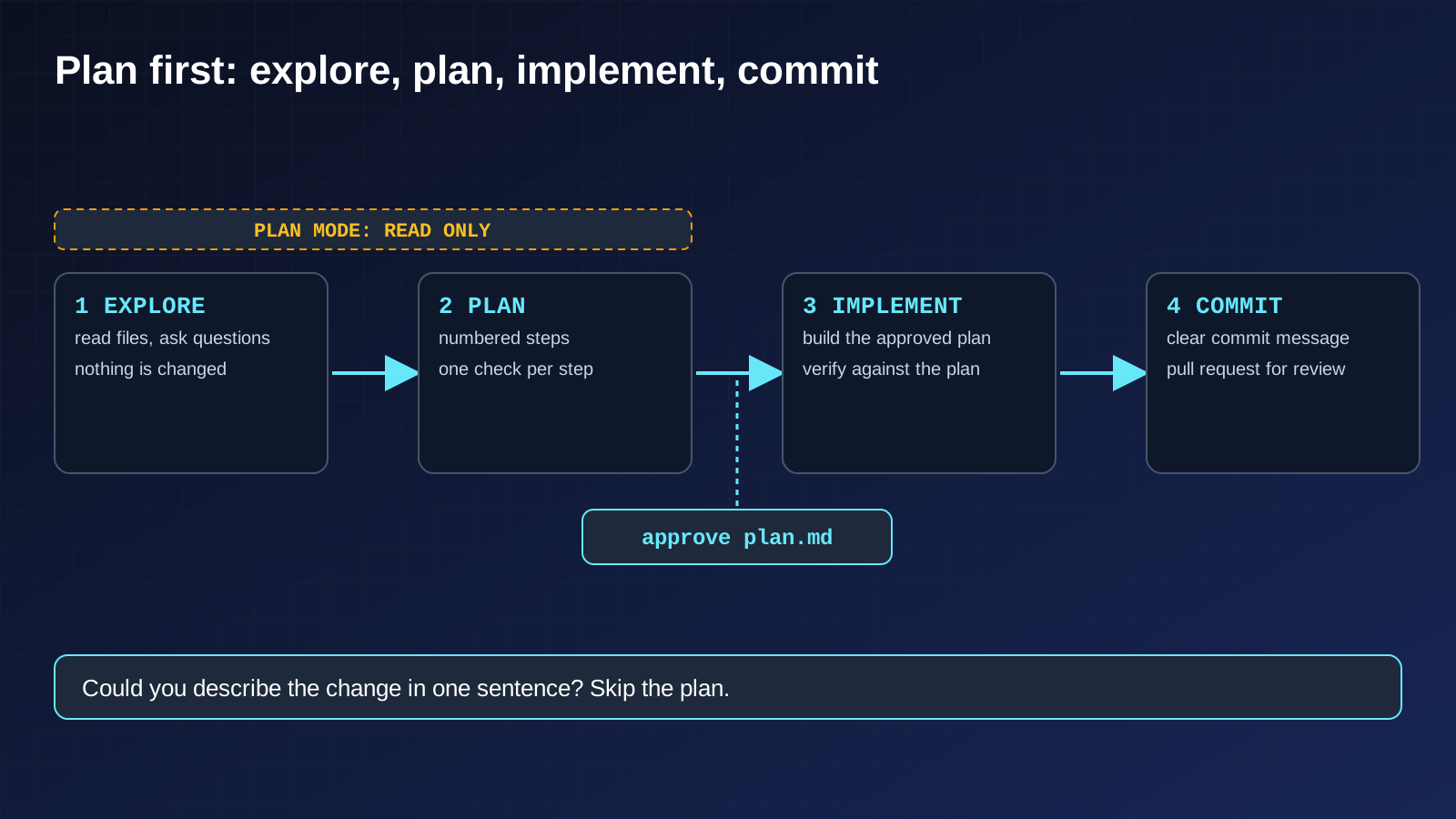
Anthropic recommends four phases: explore, plan, implement, commit. Claude Code has a plan mode for the first two. In plan mode the agent can read files and answer questions but cannot change anything. You switch it on by pressing Shift+Tab until the status bar shows it, or by starting with claude --permission-mode plan.
For the password reset it looks like this:
- Explore. “Read how we handle sessions and where secrets are stored.” A question, not an order.
- Plan. “What files need to change, and what is the flow? Make a plan.” The docs note that
Ctrl+Gopens the plan in your text editor so you can edit it before anything starts. - Implement. Approve the plan, then tell it to build it, write tests, run them and fix failures.
- Commit. Ask for a clear commit message and a pull request. A commit is a saved snapshot of changes. A pull request is a proposal to add those changes to the main project, so people can review them.
Our practice: treat the plan as a contract. Removing a wrong step from a plan costs one line. Removing it from finished code costs a whole review.
Planning has a cost, and Anthropic says so. For a typo, a log line or a rename, just ask for the change. The rule in the guide is easy to remember: if you could describe the change in one sentence, skip the plan.
Named rules we use for plans (our practice):
- Write the plan as numbered steps, each with one output and one check.
- Name the files each step reads and writes.
- Mark which steps are independent and can run at the same time.
- Write the checks before the work, not after.
- Save the plan to a file (we call it
plan.md) and pause for your approval before anything changes.
6. Context: The Agent’s Short-Term Memory
Here is the single constraint behind most advice in Anthropic’s guide: Claude’s context window fills up fast, and its performance gets worse as it fills. The context window is everything the agent is holding in mind during a session: your messages, every file it read, every command output. Think of a desk. A clear desk lets you work well. A desk buried in paper does not.
That is why many habits are really desk-cleaning habits:
- Reset between unrelated tasks with the
/clearcommand. The guide names the opposite the kitchen sink session: you ask about one thing, then something unrelated, then return to the first, and the desk is covered in irrelevant paper. - Compact on purpose. When the window nears full, Claude automatically summarizes the conversation to free space. You can steer what it keeps, for example “focus on the API changes”, or write into your memory file which things must always survive, such as the list of changed files and the test commands.
- Look at what is loaded. The
/contextcommand shows what is in the window. - Ask quick side questions cheaply with
/btw, whose answer never enters the conversation history. - Scope your investigations. The guide names “the infinite exploration”: if you say “investigate this” with no limits, Claude may read hundreds of files and fill the desk. Ask a narrow question, or hand the job to a subagent (section 11).
Named rules we use for context (our practice):
- Load only what each step needs: the briefing file, plus the files the step names.
- When you hand work to a subagent, pass the step, its inputs and its check, not the whole conversation.
- Keep long logs and raw command output out of the main session. Ask for summaries as paths, verdicts and evidence.
- Keep the main session for decisions, not for searching.
7. Tools and Hooks: Make the Rules Automatic
Tools. Anthropic calls command-line tools the most efficient way for the agent to work with outside services, because they use little of the desk. A command-line tool is a program you run by typing commands, such as gh for GitHub. Install the ones you use and tell Claude to use them. For services without a good command-line tool, MCP servers connect things like an issue tracker or a database. (MCP is a standard way to plug outside tools into an AI agent.) Claude can even learn an unfamiliar tool by reading its --help text.
Hooks. A hook is a small script that Claude Code runs automatically at a set moment, such as just before the agent edits a file or just after it finishes. Anthropic describes the point exactly: hooks give you deterministic control, so some things always happen instead of relying on the model to remember to do them. Deterministic just means the same thing happens every time.
Our rule of thumb: if you would be upset to see it skipped even once, it is not an instruction. It is a hook. Formatting, linting, type checks and blocking writes to a protected folder all belong here. A prompt is for judgment only.
| Event | When it fires | Typical use |
|---|---|---|
PreToolUse | Before the agent uses a tool; can block it | Stop edits to a protected folder, deny a dangerous command |
PostToolUse | After a tool succeeds | Auto-format or lint after each edit |
Stop | When Claude finishes responding | Run your checks and refuse to finish until they pass |
SubagentStop | When a helper finishes | Check the helper’s output |
PreCompact, PostCompact | Around summarizing | Save or restore what must survive |
SessionStart | When a session begins or resumes | Load context |
Mechanics worth knowing, all from the hooks guide:
- A hook receives details about the event as JSON (a simple structured text format) and replies through its exit code and output. An exit code is the number a program returns when it finishes. Zero usually means fine.
- Exit code 2 blocks the action, but only before it happens. On
PreToolUseit blocks the tool call, and the reason you write to the error output is passed back to Claude so it can adjust. OnPostToolUsethe tool has already run, so exit code 2 cannot undo it. Claude only sees your message. - Exit code 0 on a
PreToolUsehook does not approve the action. The normal permission process still applies. - If several hooks match, all of them run. One hook saying no does not cancel what another hook does, so do not rely on that.
- Matchers narrow the scope.
Edit|Writematches file-editing tools.Bashmatches shell commands. - Files can also change through shell commands. If a hook must see every change, the docs suggest a
Stophook that scans the project once per turn. Stophooks have a cap of 8 consecutive blocks. After a Stop hook has kept the turn going eight times in a row, Claude Code ends the turn anyway, so a stuck agent cannot loop forever. The count resets each time Claude calls a tool.
Claude can write hooks for you. The guide’s examples are “run eslint after every file edit” and “block writes to the migrations folder”. Read what it writes, because a hook runs with your permissions.
Named rules we use for hooks (our practice):
- List every hook and script in the briefing file, so the next session knows what runs automatically.
- Never rely on the model to remember a deterministic rule.
- If a required tool is unavailable, name the blocker and keep the steps that can still be completed, instead of silently skipping the rule.
8. Permissions: What It May Do Without Asking
Hooks and tools decide what happens. Permissions decide what the agent may do on its own. In the cautious default, Claude asks before writing files or running commands. That is safe but tiring. The guide’s blunt observation: after the tenth approval you are clicking through, not reviewing. Two documented tools help:
- Allowlists pre-approve specific safe actions, such as
npm run lintorgit commit. Manage them with/permissions. - Sandboxing adds isolation from the operating system that limits what files and network the agent can reach, so it can work freely inside a fenced area.
Anthropic also describes an auto mode where a separate checker model reviews actions and blocks risky ones, for example going beyond the task, touching unknown systems, or acting on instructions hidden in untrusted content. Which mode you start in depends on your version and plan, so check the docs.
Check the active permissions before a run starts. Where a rule must be enforced, configure it in tool rules or the sandbox. Words in a prompt are not a boundary.
Named rules we use for permissions (our practice):
- Ask before publishing, sending or spending. Anything that leaves your machine or costs money needs a person.
- Never let two sessions edit the same file. Give each its own copy of the project (a worktree, section 13).
- Keep a recoverable version before a risky change, for example a commit, so you can go back. Claude’s checkpoints help but, as Anthropic notes, they do not replace git.
- Choose how tight to be by what a mistake would cost, not by how much you trust the agent today.
9. Memory: The Briefing File
The agent forgets everything between sessions. A file called CLAUDE.md fixes that. Claude reads it at the start of every conversation, like a briefing note left for a new colleague on their first day.
The memory docs say where the file can live. They are loaded from broadest to most specific:
| Scope | Location | Who gets it |
|---|---|---|
| Organization | A path set by the company’s IT team | Everyone in the organization |
| You | ~/.claude/CLAUDE.md | Only you, in every project |
| Project | ./CLAUDE.md or ./.claude/CLAUDE.md | The team, shared through git |
| Local | ./CLAUDE.local.md | Only you, this project only |
(Git is the standard tool for tracking changes to code and sharing them with a team.)
The most important sentence in that documentation is this one: Claude treats CLAUDE.md as context, not as enforced configuration. A line in the file is a request, not a lock. When something must always hold, the docs point to a hook, which we cover in section 7.
What belongs in it. The guide’s list: commands the agent cannot guess, style rules that differ from the usual, how to run tests, team etiquette such as how to name branches, design decisions specific to this project, quirks of the setup, and gotchas that are not obvious. What does not: anything the agent can read from the code itself, standard rules it already knows, long reference documentation (link to it instead), things that change often, and file-by-file tours of the project.
How long. Aim for under about 200 lines. Longer files reduce how well the instructions are followed, because important rules get lost in the noise. Rules that only matter for one part of the project can go in path-scoped rules, which load only when the agent works on matching files. Knowledge needed only sometimes can go in a skill, a reusable instruction pack the agent loads on demand.
How to word it. Make every line checkable. “Run npm test before committing” can be checked. “Write good tests” cannot.
How to keep it alive. Treat it like code. Keep it in git, review it when the agent misbehaves, and prune it. The guide gives a simple test for each line: would removing this cause a mistake? If not, delete it. The /doctor command can suggest cuts, and a prompt audit looks for outdated instructions, references to files that no longer exist and lines that contradict each other.
There is also auto memory: notes Claude writes itself from your corrections. It loads at the start of each session, up to a documented limit of the first 200 lines or 25KB. Read it now and then, because it can hold a wrong lesson as easily as a right one. That last point is our advice, not a documented rule.
A starting skeleton, in our words:
# Commands
- build, run one test, lint and type check: <exact commands>

# Rules that differ from the usual
- <one line each, each one checkable>

# Done means
- the check passes and the change matches the approved plan
- the final message shows the command that ran and its output

# Gotchas
- <what broke last time, in one line>

# When compacting, keep
- the list of changed files and the test commands
10. Verification: A Check That Can Fail
If we could keep only one layer, it would be this one. Anthropic puts it first: give Claude a way to verify its work.
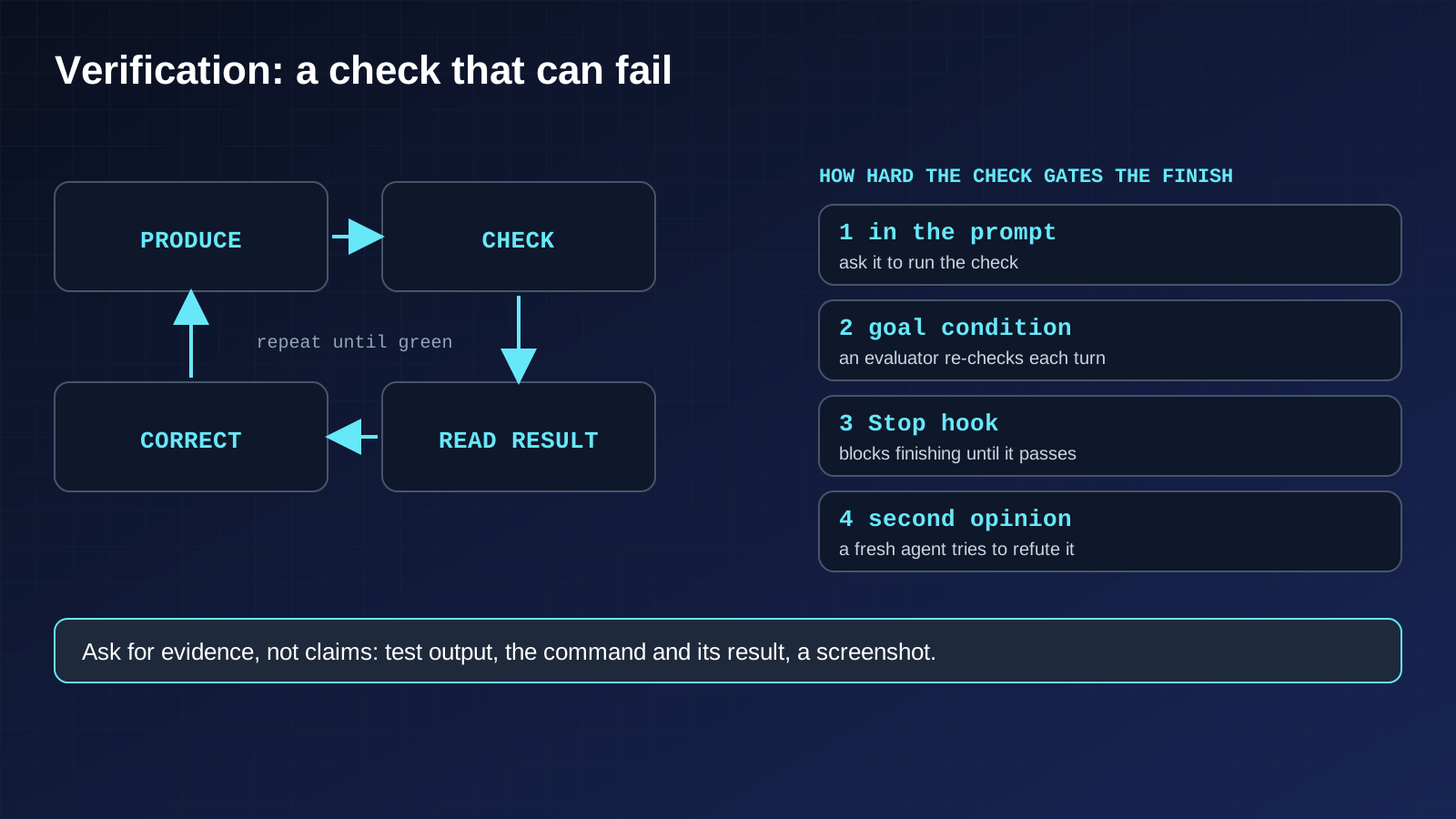
The logic is simple. Claude stops when the work looks done. If it has no test it can run, “looks done” is the only signal it has, and you become the checker, noticing every mistake yourself. If it has a check that returns pass or fail, the loop closes on its own: do the work, run the check, read the result, try again.
Write the check before the work. This is our practice. A check written afterwards tends to describe what the code already does, not what it should do.
For the password reset, good checks are an automated test that requests a reset and confirms an email is produced, a test that the link stops working after one use, and a successful project build. The guide’s list of checks: a test suite, a build that must succeed, a linter (a tool that flags code problems), a script that compares output against a known good example, or a screenshot compared with a design.
The weak and strong versions of a request differ in one way:
| Weak | Stronger |
|---|---|
| ”Make the dashboard look better." | "Implement this design, take a screenshot of the result, list the differences and fix them." |
| "The build is failing." | "The build fails with this error. Fix the root cause, do not hide the error, and confirm the build passes." |
| "Add email validation." | "Write validateEmail with these example cases, run the tests and show the output.” |
Look at the middle row. “Address root causes, not symptoms” appears in the guide for a reason. No error message does not mean the code is right, and a check that only looks for errors can be satisfied by hiding them.
How strictly the check gates the finish. Anthropic describes four levels:
- In the prompt: ask the agent to run the check and keep going until it passes.
- Across a session: set the check as a
/goalcondition, and a separate evaluator re-checks it after every turn. - As a hard gate: a
Stophook runs your check as a script and blocks the turn from ending until it passes. - By a second opinion: a separate agent tries to prove the result wrong, so the agent that did the work is not the one grading it.
Choose the lowest level that still lets you walk away. And ask for evidence, not claims: the test output, the command and what it returned, or a screenshot. The guide notes that reading evidence is faster than redoing the check yourself, and it works for sessions you did not watch.
One line from the guide’s failure list is worth repeating: if you cannot verify it, do not ship it.
A verification table we use (our practice). For each requirement in the plan, keep one row in a file, for example checks.md:
| Step | Requirement | Verdict | Evidence |
|---|---|---|---|
| 2 | Reset email is sent | pass | test output saved at the path shown |
| 3 | Link works once only | fail | second use still accepted, see log |
| 4 | Build passes | unresolved | not run yet |
The verdict is pass, fail or unresolved. Leave missing evidence visible instead of rounding it up. The model’s own confidence comes last, after real signals such as tests, builds, type checks, screenshots and the actual output.
11. Subagents: Helpers With Their Own Desk
A subagent is a helper that Claude can hand a side job to. It has its own context window, its own instructions, its own tool access and its own permissions. Anthropic’s description of when to use one: a side task would flood your main conversation with search results, logs or file contents you will not need again. The subagent does that work on its own desk and returns only a short summary.
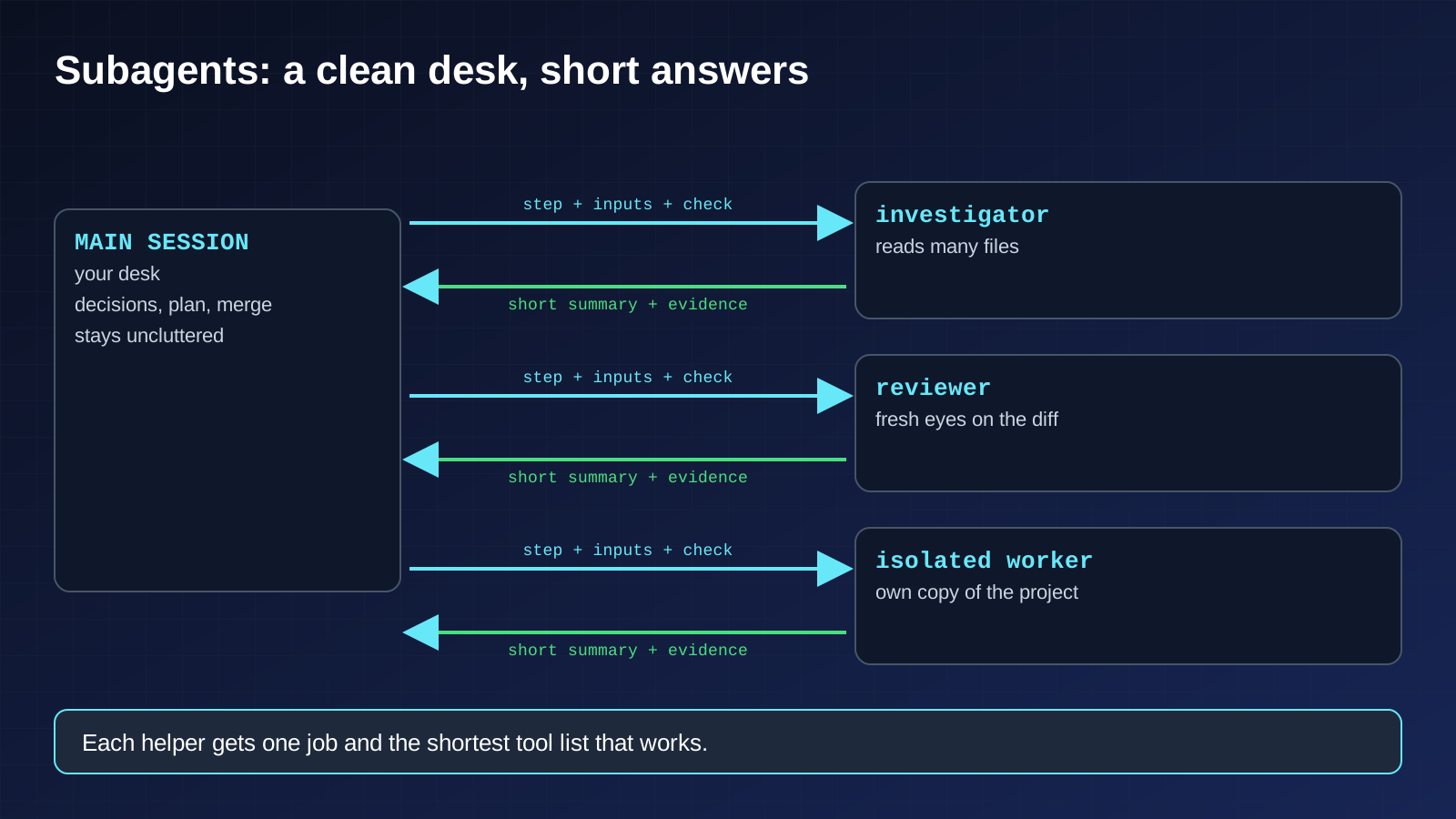
So the main benefit is keeping your own desk clean, not speed. We use three kinds:
- The investigator. Reads many files and brings back one paragraph. For the password reset: “find out how we currently send email and whether there is a helper we should reuse.”
- The reviewer. Looks at the changes and your criteria with fresh eyes, without seeing the reasoning that produced them. The guide calls this an adversarial review step. It warns that a reviewer asked to find gaps will usually find some, even when the work is fine, and chasing all of them leads to over-engineering. Tell it to report only gaps that affect correctness or the stated requirements.
- The isolated worker. Runs in a temporary git worktree, which is a separate working copy of the project, so parallel edits do not collide.
You bound a subagent with fields in a file under .claude/agents/, all documented:
| Field | What it limits |
|---|---|
tools, disallowedTools | What it may use, so a reviewer can read and search but not edit |
model | Which AI model it runs on |
permissionMode | How it handles permission prompts |
maxTurns | How many steps it may take before stopping, with output marked partial |
isolation: worktree | Runs in its own temporary copy, cleaned up if nothing changed |
memory | Whether it keeps notes across sessions |
skills | Instruction packs preloaded for it |
Our rules for using them:
- One narrow job per subagent, with the shortest tool list that works.
- Write the brief like a handover note. It gets its own instructions and basic environment details, not your whole conversation. State the goal, the files, what is out of scope and what counts as a finding.
- Ask for a short, structured return: summary, evidence, open questions.
- Watch usage. Subagents make their own requests, which count toward the same usage limits as your main conversation.
12. The Execution Loop: Run, Check, Return, Repeat
Once the plan and checks exist, a run is a loop. This is the shape we use. It is our practice, built from the documented pieces.
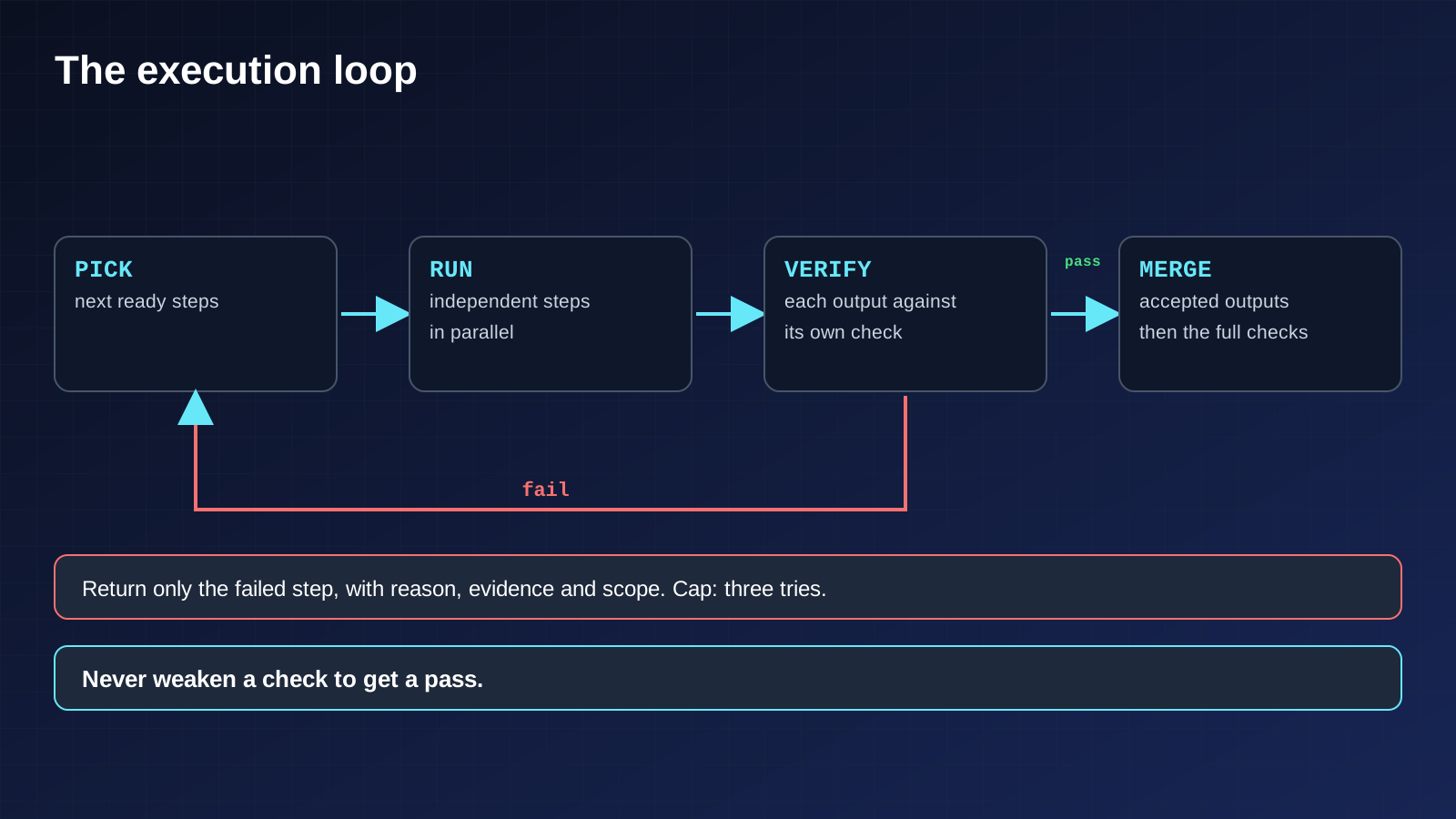
- Read the plan and pick the next ready steps. A step is ready when the steps it depends on are done.
- Run independent steps in parallel, each in its own session or subagent.
- Verify every output against its own check as it arrives.
- Return failed steps, never the whole batch. If four pieces are built and one fails, send back only that one, with the reason, the evidence and a scope line such as “fix only this step”. Sending back everything rewrites correct work and turns one failure into four uncertain results.
- Merge the accepted outputs and run the full checks.
- Continue until the work is complete, a blocker appears or the run limit is reached.
Two rules keep the loop honest:
- Cap retries at three attempts per step. If a step fails three corrections, the problem is probably in the plan that produced it, and more retries will not see that. Stop and go back to the plan.
- Never weaken a check to get a pass. If a check is wrong, change it openly, as its own decision, and write down why.
The documented pieces behind this loop: a Stop hook has a built-in cap of eight consecutive blocks so a stuck agent cannot spin forever, and Anthropic’s own failure list warns against correcting over and over in one cluttered session.
13. Scaling Out: Many Agents at Once
When one agent works well, the documented ways to do more at once are:
- Worktrees: several sessions, each in its own copy of the project, so edits do not collide.
- Writer and reviewer sessions: one session builds, a fresh one reviews. A fresh session is not biased toward code it just wrote. The same trick works for tests: one session writes the tests, another writes code to pass them.
- Cloud and background sessions, and agent teams (experimental and off by default) for more automated coordination.
- Non-interactive runs:
claude -p "prompt"runs Claude from a script, for automated checks and pipelines, and can return plain text or structured JSON. - Fan-out: the
/batchcommand splits a big change across 5 to 30 subagents, each in its own worktree, or your own loop overclaude -pcalls with--allowedToolsto pre-approve what the batch needs.
The guide’s fan-out recipe is worth copying. Have Claude write the list of tasks to a file, write a script that loops over the list, test it on a few items, then run the whole thing. Our rule: start small, and widen only after one run is clean.
14. Session Habits: Steer Early, Rewind Freely
- Correct as soon as you see drift.
Escstops the agent mid-action and keeps the context. PressingEsctwice or running/rewindopens checkpoints, where you can restore the conversation, the code or both. “Undo that” asks it to revert. - Checkpoints are not git. They track changes made through Claude’s file-editing tools, not changes made by shell commands or other programs.
- After two failed corrections, clear and restart. The guide’s reasoning: the context is now full of failed attempts, and a clean session with a sharper prompt usually beats a long one with piled-up corrections.
- Name and resume sessions with
claude --continueor--resume, so each piece of work keeps its own context. - Use judgment. The guide itself says to develop your intuition: sometimes history is valuable, sometimes a vague prompt is right, sometimes planning is just overhead.
15. Feedback: Decide Where the Rule Lives
Every harness fails in the same few ways. After a failure, the useful question is not “what do I say next?” but “where should this rule live?” Our ladder, weakest to strongest:
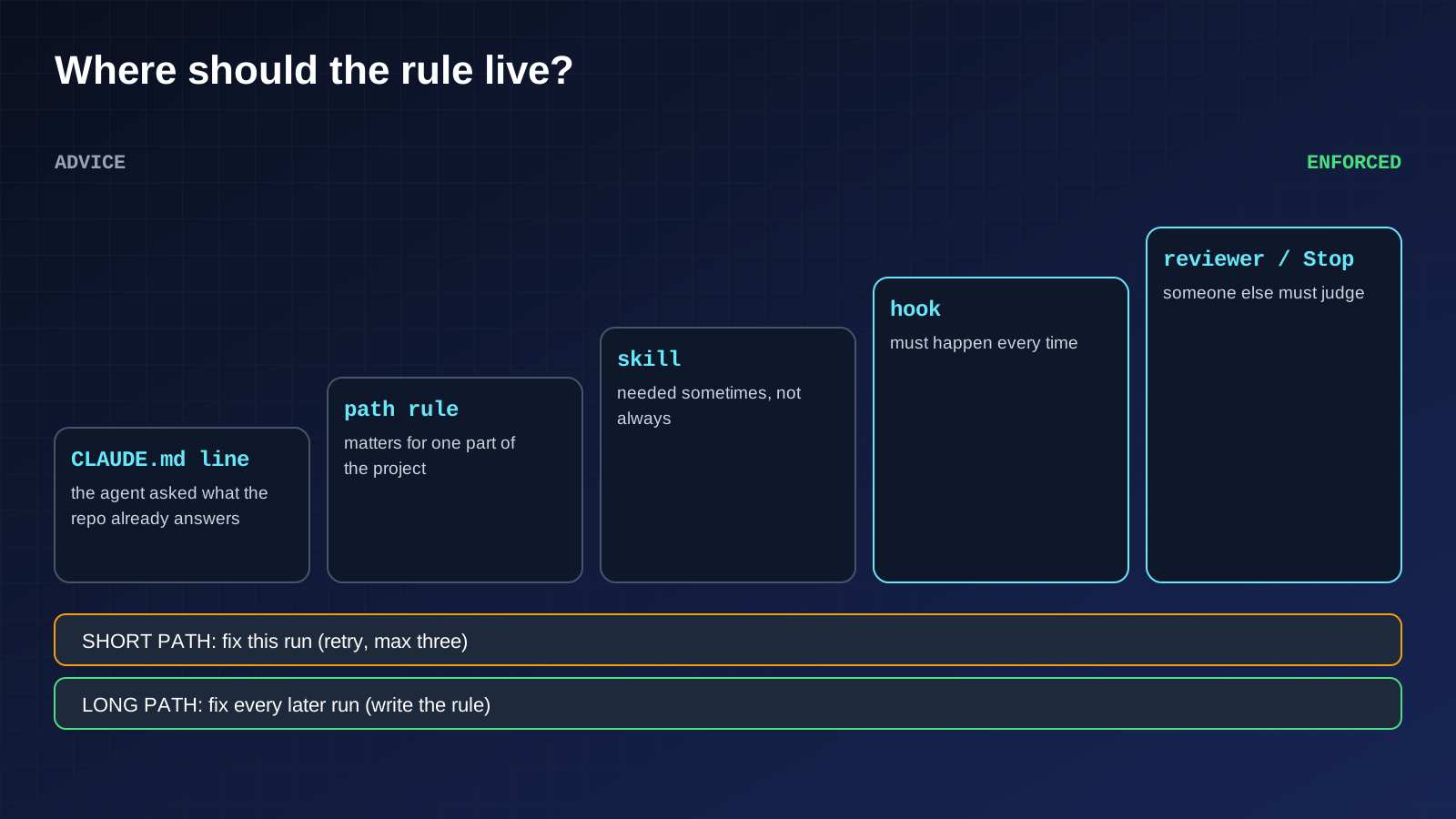
| What went wrong | Where the fix goes |
|---|---|
| The agent asked something the project already answers | One checkable line in CLAUDE.md |
| A rule matters for only one part of the project | A path-scoped rule that loads only there |
| Knowledge is needed sometimes, not always | A skill, loaded on demand |
| It must happen every time | A hook |
| Someone other than the author must judge it | A reviewer subagent or a Stop check |
Then the loop:
- Correct the agent.
- If the same mistake appears twice, write the rule at the right rung of the ladder.
- Clear the session and retry with the better prompt, so you are testing the rule and not the history.
- Prune now and then: delete rules the model now follows without being told, fix contradictions, and read auto memory for lessons that are wrong.
The two return paths. A harness needs two ways for lessons to flow back, and most people build only the first.
- The short path fixes this run. When a check fails, the step goes back with the reason, the evidence and the scope (“fix only this step”), capped at three attempts, as in the loop above.
- The long path fixes every later run. When you catch a mistake, or a correction lands, write the rule into CLAUDE.md, a path-scoped rule, a skill or a hook, using the ladder above, so the next session never repeats it. A system that is fast but never gets smarter has only the short path.
16. Completion: Checking the Finish Line
A task is not done when the agent says it is. Before the final message, we write a completion checklist built from the acceptance checks. Every item must point to observable evidence.
- Every output exists and can be opened.
- Every check ran against the saved version, not an earlier one.
- Failures are either fixed or explicitly reported.
- The briefing file holds every new rule learned during the run.
If a limit or a blocker stops the run, the right result is a partial status with the exact steps left, not a confident summary that hides the gap.
17. Handoff: Leaving a Clean Trail
Long work crosses sessions, and the next session starts with an empty desk. We keep one short progress file (for example progress.md) and update it after each stage. It holds:
- Plan: steps done, running and blocked.
- Outputs: the exact paths to the current saved files.
- Decisions: what changed in the harness and why.
- Open issues: failures, uncertainties and blockers.
- Next action: the next ready step.
On resuming, the new session reads the briefing file, the plan and the progress file first, then continues from the recorded next step. These are the same things worth keeping through a context summary.
18. Delivery: What You Hand Back
The documented last step is a clear commit message and a pull request, which works well when gh is installed. On top of that, we hand back a small, consistent package:
- The deliverable itself.
- The plan, the checks table and the progress file.
- The diff of the briefing file, so you can see which rules were added.
- A plain statement of what was checked, what passed, and what remains unresolved.
- Usage figures only when they are actually available. Do not estimate savings you did not measure.
After review, save the working harness as a reusable template, so the next task starts from a tested setup. And match human attention to the cost of undoing a change: small, easily reversed work can flow through an automatic check, changes to shared code get checks plus a review, and anything hard to reverse, such as database migrations, deletions or real customer data, stays a human decision.
Failure Patterns, From Anthropic’s Own List
| Pattern | What it means | Fix |
|---|---|---|
| The kitchen sink session | Unrelated topics pile up in one conversation | /clear between tasks |
| Correcting over and over | Failed attempts clutter the context | After two failed corrections, clear and write a better prompt |
| The over-specified CLAUDE.md | So many rules that the important ones get lost | Prune, or turn rules into hooks |
| The trust-then-verify gap | Plausible code that misses edge cases | Always give a check; if you cannot verify it, do not ship it |
| The infinite exploration | An unscoped “investigate” fills the context | Scope the question, or use a subagent |
Glossary
- Agent: an AI that takes actions toward a goal, not just answers.
- Harness: the setup around an agent: instructions, limits, checks and feedback.
- Context window: everything the agent is holding in mind during a session.
- Plan mode: a mode where the agent can read but not change anything.
- CLAUDE.md: the briefing file the agent reads at the start of each conversation.
- Hook: a script that runs automatically at a set moment and can block an action.
- Subagent: a helper with its own context, tools and permissions.
- Worktree: a separate working copy of a project, used so parallel edits do not collide.
- MCP: a standard way to connect outside tools to an AI agent.
- Sandbox: an isolated area that limits what the agent can reach.
- Pull request: a proposal to add changes to a project, for review.
The Rule to Adopt
Never let an agent decide that its own work is finished. Define done as a check it can run, enforce the rules that must hold in code, and let it show you the evidence.
Where Incresco Fits
Incresco is a Claude partner. This is the setup we use when we build AI agents ourselves. If you want the same discipline in the agents your business relies on, contact Incresco and ask about an AI transformation plan that starts with one workflow.
Sources: Anthropic, Claude Code docs: Best practices, Memory and CLAUDE.md, Hooks guide, Hooks reference, Subagents, Permission modes, Checkpointing, Commands (including /batch), Goal, Agent teams, Run Claude Code programmatically. Commands, defaults and plan availability change between versions, so check the docs for yours.
Related Articles
Business
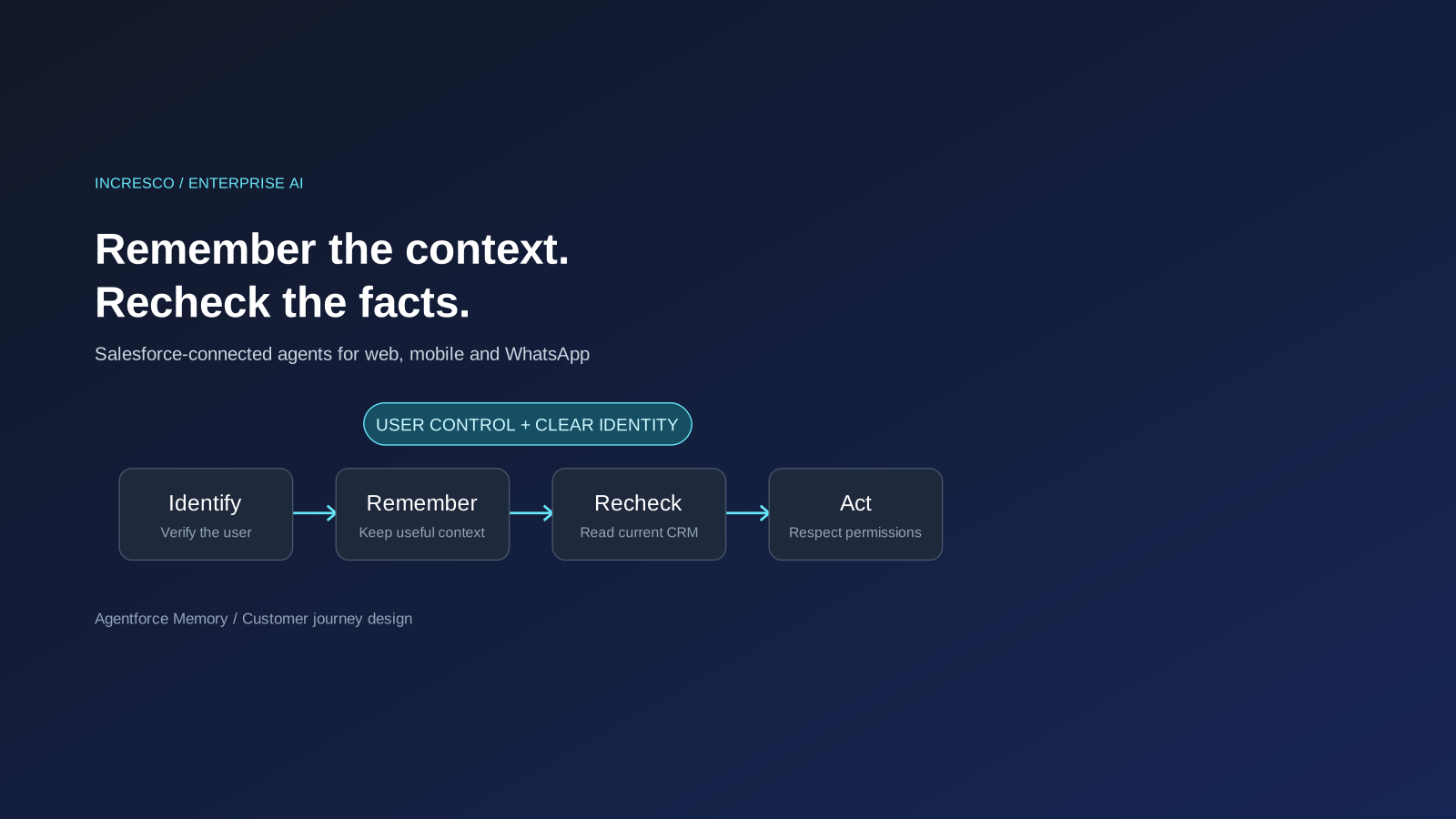
Agentforce Memory: What Salesforce and WhatsApp AI Agents Should Remember
Salesforce's new Agentforce Memory engineering article explains persistent context. What should web, mobile and WhatsApp AI agents remember, refresh or forget?
Read Insight
Engineering
Agentforce Voice for Agent Script: What to Check Before Your Salesforce Agent Starts Talking
Salesforce says you can add voice to an Agent Script agent without a rewrite. See what your org needs first and how to write agent instructions for the ear.
Read Insight